
You can use the Organisation area to set shared assessment context for your organisation and adjust retrieval settings that apply at organisation level.

Step by step
- Open Organisation.
- Select Context.
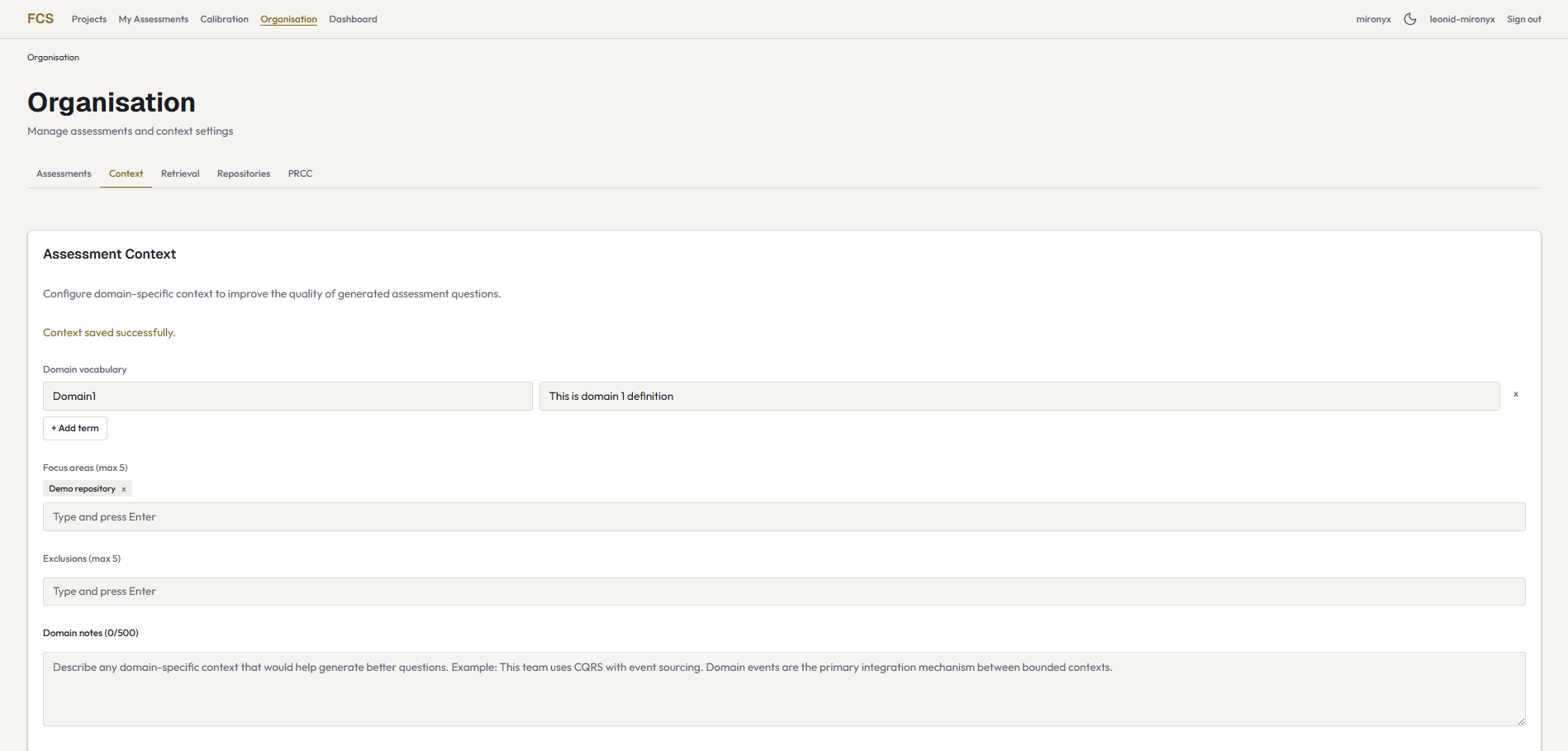
- In Assessment Context, enter the organisation context you want assessments to use:
- Add Domain vocabulary as term-and-definition pairs.
- Add up to 5 Focus areas for topics to emphasise.
- Add up to 5 Exclusions for topics to leave out.
- Enter Domain notes for additional context.
- Save your changes.
When the update succeeds, you will see Context saved successfully.
- Select Retrieval.
- Update the retrieval settings you need:
- Enable tool-based retrieval to turn retrieval on or off.
- Per-assessment spend cap (cents) to set the allowed spend from 0 to 500.
- The retrieval timeout field to set how long retrieval can run, from 10 to 600 seconds.
- Save your changes.
When the update succeeds, you will see Retrieval settings saved.

Good to know
You need organisation admin access to use Organisation. If you do not have the right access, you cannot update these settings.
- In Context, blank vocabulary terms, blank definitions, blank focus areas, and blank exclusions are rejected.
- Focus areas and Exclusions are limited to 5 entries each, and Domain notes must be 500 characters or fewer.