
You can manage organisation-wide assessment context and retrieval settings from Organisation. This helps you keep shared context up to date and control the retrieval values used for your organisation.

Step by step
- Open Organisation from the main navigation.
- Choose Context to update your organisation’s assessment context.
- In the context form, update the organisation information used for assessments. The saved context can include:
- domain vocabulary
- focus areas
- exclusions
- domain notes
- Save your changes in Context.
- Choose Retrieval to update retrieval settings for the organisation.
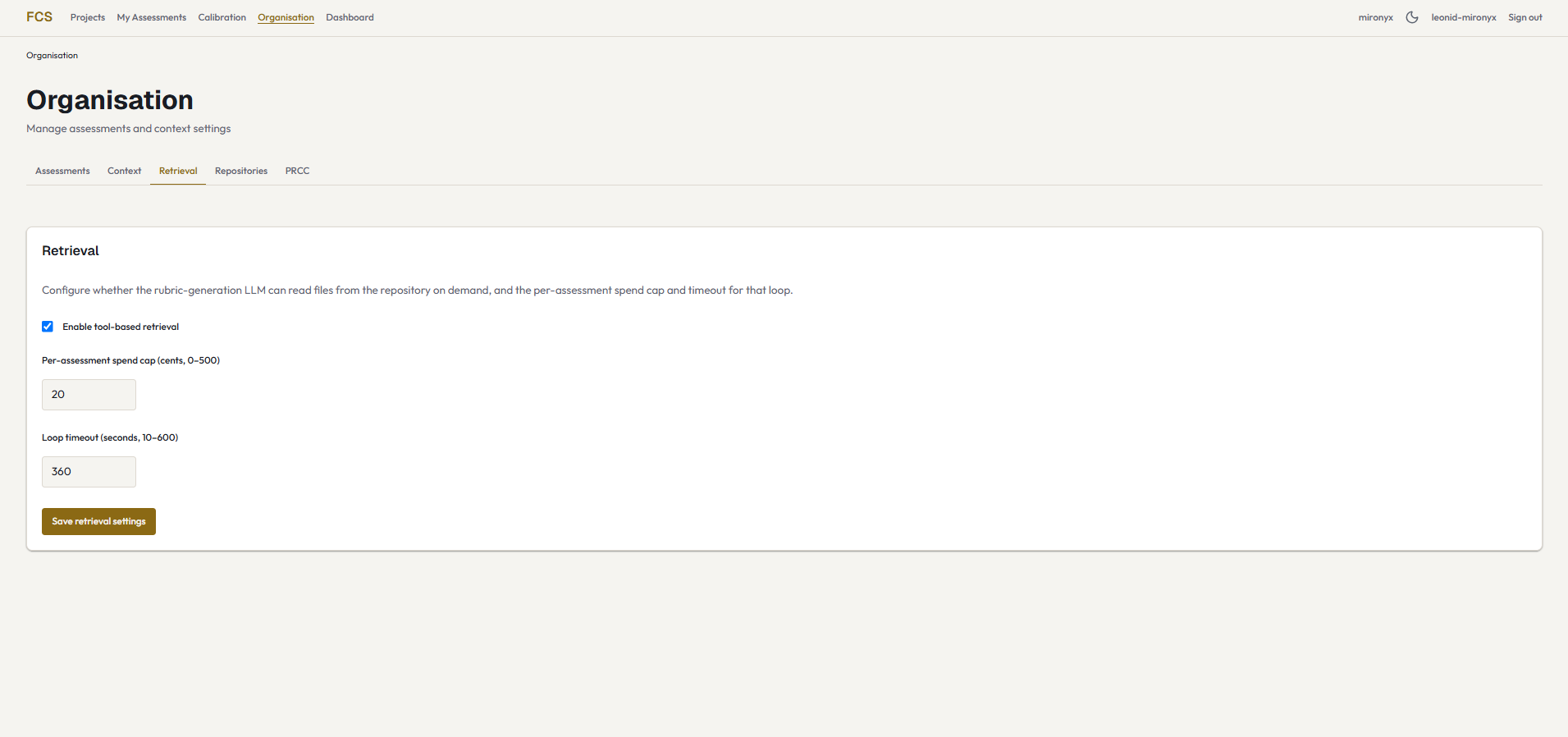
- In Retrieval, review and set these values:
- tool_use_enabled: turns tool use on or off
- rubric_cost_cap_cents: sets the cost cap in cents
- retrieval_timeout_seconds: sets the retrieval timeout in seconds
- Save your changes in Retrieval.

Good to know
Only organisation admins can open or update these settings. If you do not have organisation admin access, you cannot manage them.
- Retrieval settings are validated when you save them. The allowed ranges are:
- rubric_cost_cap_cents: 0 to 500 - retrieval_timeout_seconds: 10 to 600
- If retrieval settings have not been saved yet, the organisation uses these defaults:
- tool_use_enabled: off - rubric_cost_cap_cents: 20 - retrieval_timeout_seconds: 120